Plans
Plans help you organize and execute multi-step improvements to your manuscript. When working with the editor on complex revisions, you can create a plan that breaks down the work into manageable action items.
What is a Plan?
A plan is a structured approach to tackling larger editing tasks. Instead of making changes all at once, the editor can:
- Break down complex revisions into discrete steps
- Track progress on each step
- Work through changes methodically
- Pause and resume work at any point
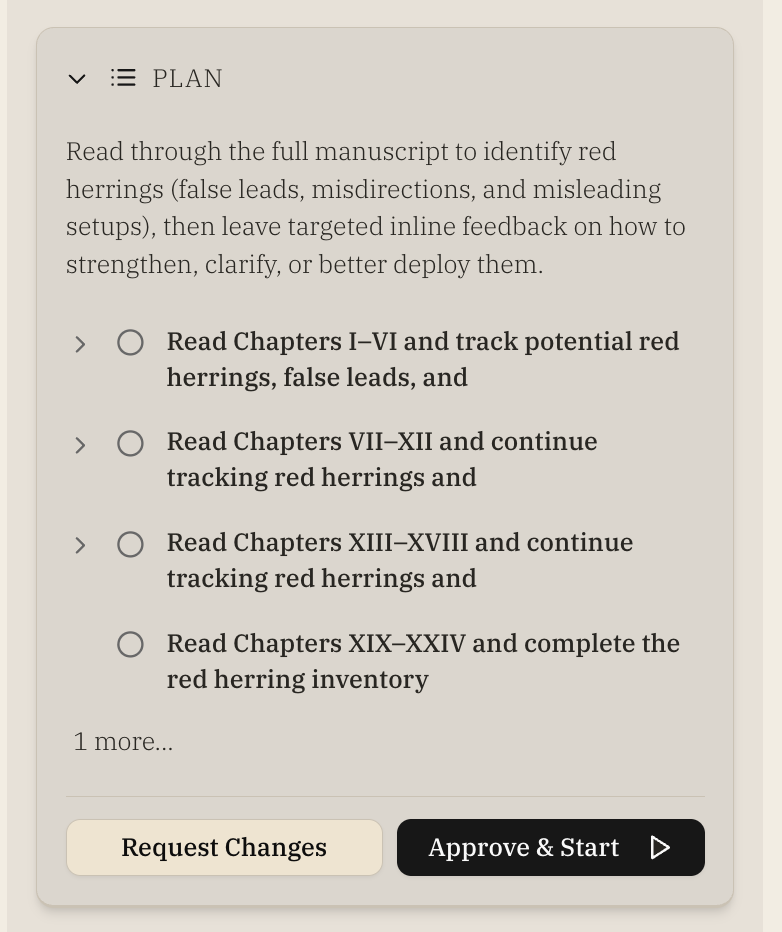
Creating a Plan
When you ask the editor for help with a significant revision, they may suggest creating a plan. You can also explicitly request one:
- "Can you create a plan to improve the pacing in chapter 3?"
- "Help me plan out how to strengthen my protagonist's arc"
- "I need a plan to address all the dialogue feedback"
Working with Plans
Once a plan is created, you'll see it displayed in the chat with:
- A list of steps to complete
- Progress indicators for each step
- Options to work through items or modify the plan
Progressing Through a Plan
You can work through plan items in several ways:
- Step by step: Ask the editor to help with the next item
- All at once: Request the editor complete multiple items
- Selectively: Choose specific items to work on
Pausing and Resuming
Plans are saved with your chat history. You can:
- Close the chat and return later
- Switch to other tasks and come back
- Resume exactly where you left off
Deleting a Plan
If you no longer need a plan, you can delete it in two ways:
- From the plan card: Click the trash icon in the bottom-left corner of an open plan card. You'll be asked to confirm before the plan is removed.
- Ask the editor: Tell the editor to delete the plan (e.g., "delete the plan"). The editor will confirm with you before deleting.
Deleting a plan stops any in-progress work and removes the plan from your chat. This action cannot be undone.
Best Practices
- Be specific: The more detail you provide about your goals, the better the plan
- Start small: For complex revisions, consider breaking work into multiple smaller plans
- Review progress: Check completed items to ensure changes meet your expectations
- Iterate: Plans can be adjusted as you work through them
Example Use Cases
Addressing Feedback
After receiving developmental feedback, create a plan to systematically address each comment:
- Review and categorize feedback
- Prioritize changes by impact
- Work through revisions chapter by chapter
- Verify improvements with new feedback
Character Development
Plan a character arc enhancement:
- Identify current arc weaknesses
- Plan additional scenes or beats
- Strengthen motivation and conflict
- Review consistency across chapters
Pacing Improvements
Create a plan to improve story pacing:
- Analyze current chapter lengths and beats
- Identify slow or rushed sections
- Plan cuts or expansions
- Implement changes systematically