Chat Features
- Conversation History: All chats are saved and can be accessed from the chat list
- Action Items: You can chat about the developmental feedback on your document and work through action items step by step
- Context Awareness: The chat knows which document you're viewing and can reference specific chapters
- Take Action on Your Behalf: The chat can perform actions like searching your project, analyzing specific sections, and leaving comments with feedback on the document
- Documentation Search: Ask questions about Writers Room features and get answers with links to the official documentation
- Plans: Create and execute multi-step revision plans with the editor's help
Opening the Chat
- Click the chat icon in the top navigation bar
- The chat panel slides in from the right side of the screen
- Chat remains accessible across all pages within your project
- You can create multiple chat threads to manage your conversations with the editor
- Chats are specific to the project you're working on
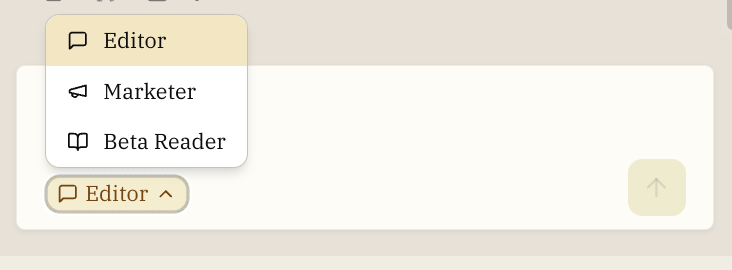
Editor Skills
The editor can do more than just answer questions—it can take action on your manuscript:
Search and Analysis
- Search your project for specific content, characters, or themes
- Analyze sections for pacing, dialogue, or other elements
- Find relevant passages based on your questions
Feedback and Comments
- Create comments directly on your manuscript through chat
- Generate targeted feedback on specific sections
- Help you work through existing feedback action items
Planning
- Create structured plans for complex revisions
- Track progress on multi-step editing tasks
- Break down large changes into manageable action items
Following Your Rules
- Automatically checks and follows your project Rules when generating suggestions
- Applies your style preferences to rewrites and feedback
- Detects and alerts you to conflicts between rules
Documentation Search
- Answers questions about Writers Room features and functionality
- Searches the official documentation to provide accurate, up-to-date information
- Always includes links to the relevant documentation pages for reference
- Helps you learn how to use features like feedback, exporting, insights, and more
You can ask questions like:
- "How do I create feedback?"
- "What are zoom levels?"
- "How do I export my manuscript?"
- "What is the story bible?"
The editor will search the documentation and provide answers with direct links to the relevant pages.
Web Search
- Search the web for information about books, authors, music, and real-world facts
- Useful when you're asking about topics outside of the built-in book database
- Sources are shown inline so you can verify the information
- The editor prioritizes your manuscript and the book database for questions they can answer
You can ask questions like:
- "Tell me about Project Hail Mary by Andy Weir"
- "What kind of music would a 1920s jazz club play?"
- "When was the Battle of Thermopylae and what really happened?"
- "What awards has Ursula K. Le Guin won?"
The editor will search the web and cite its sources.
Managing Chats
Deleting Chats
You can delete a chat by clicking the trash icon next to it in the chat list. Deleted chats cannot be recovered. Once a chat is deleted, all messages and conversation history in that chat are permanently removed.
If you have important content in a chat (such as scene drafts, brainstorming notes, or editor suggestions), consider copying it to your manuscript or notes before deleting the chat.
Renaming Chats
Chats are automatically named based on the conversation content. You can rename a chat by clicking on its title in the chat list.
Real-Time Updates
The chat shows you what the editor is doing as it works:
- Immediate responses as the editor considers your request
- Progress updates during longer operations
- Notifications when the editor takes actions on your manuscript
Bug Reports
If something isn't working right, the editor can help you report the issue directly from the chat.
When Bug Reports Appear
The editor will offer to submit a bug report when:
- You express frustration ("this isn't working", "I've tried everything")
- Something repeatedly fails despite correct usage
- You explicitly ask to report a bug or issue
- The editor encounters an unexpected error it can't resolve
How It Works
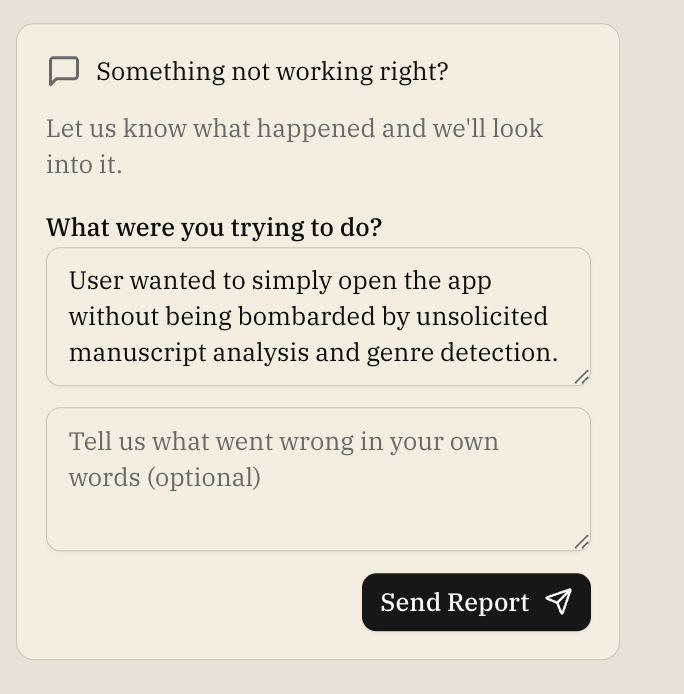
- When the editor detects an issue, a bug report form appears in the chat
- The form shows a simple prompt: "Something not working right?"
- You can optionally add your own explanation of what went wrong
- Click "Send Report" to submit
The editor automatically includes technical details about what happened, so you don't need to describe the technical aspects—just explain what you were trying to do in your own words if you'd like.
What Gets Reported
Your bug report includes:
- Context: Which project and document you were working on
- Technical diagnosis: What the editor detected went wrong (handled automatically)
- Your explanation: Any additional context you provide (optional)
This helps the development team quickly understand and fix issues you encounter.